

Drywall Calculator, Estimate Sheets, Area, and Material Needs?
Estimate how many drywall sheets you need for a room or a simple square-foot area. This tool stays focused on one job only, sheet coverage.
A drywall calculator helps you estimate how many sheets you need for a project. It turns room dimensions or square footage into a clear sheet count. This saves time and reduces material waste.
Many people guess drywall needs and end up overbuying or running short. A simple method fixes this. Once you understand area, sheet size, and waste, the numbers become easy. You can use this approach for walls, ceilings, or full rooms. It works for both small rooms and large spaces.
If you are unsure about measuring area first, you can use a Square Footage Calculator to get accurate square footage before estimating drywall.
What a drywall calculator actually helps you figure out
A drywall calculator focuses on one job, estimating sheet coverage from area. It helps you plan material needs without confusion.
Here is what it solves in real scenarios:
- Converts room dimensions into total drywall surface area
- Estimates how many drywall sheets you need
- Accounts for waste during cutting and fitting
- Works for walls, ceilings, or both together
It also supports different sheet sizes, like 4×8 or 4×12 panels. This matters because sheet size changes your final count.
For example, a larger sheet reduces seams and saves time during installation. Smaller sheets are easier to handle but increase joint work.
This method works whether you are doing a small repair or a full room installation. It keeps the estimate simple and practical.
Key measurements needed before calculating drywall
Accurate measurements make the difference between a clean estimate and wasted material. Small errors can quickly add extra sheets.
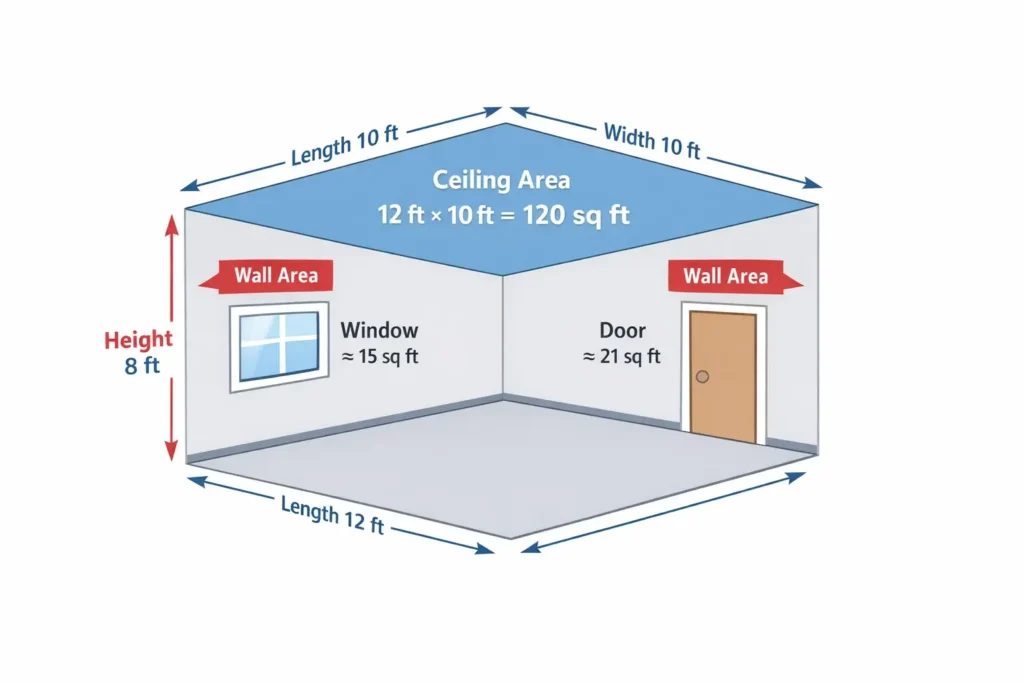
Room dimensions for wall coverage
Start by measuring the full perimeter of the room.
- Measure length and width of the room in feet
- Measure wall height from floor to ceiling
- Use this formula:
Wall area = 2 × (length + width) × height
For example, a 12×10 room with 8 ft height:
- Perimeter = 2 × (12 + 10) = 44 ft
- Wall area = 44 × 8 = 352 sq ft
Always include all wall sections, even small or narrow parts.
Ceiling area when needed
If your project includes ceilings, add that surface separately.
- Use formula:
Ceiling area = length × width
For the same 12×10 room:
- Ceiling area = 12 × 10 = 120 sq ft
Add this to wall area if you plan full drywall coverage.
Openings like doors and windows
Openings reduce the total drywall needed.
- Standard door area ≈ 21 sq ft
- Standard window area ≈ 15 sq ft
Example:
- 1 door + 2 windows
- Openings = 21 + (2 × 15) = 51 sq ft
Subtract this from total wall area to get net coverage.
This step is often skipped, which leads to overestimating material. Taking a few minutes here saves both cost and effort.
Drywall sheet sizes and how they affect calculations
Sheet size plays a direct role in your final estimate. It affects both sheet count and installation effort.
Standard drywall sizes you will see:
- 4 × 8 ft, covers 32 sq ft
- 4 × 10 ft, covers 40 sq ft
- 4 × 12 ft, covers 48 sq ft
Larger sheets reduce seams between panels. This means less joint compound and less finishing work. However, bigger sheets are harder to handle alone. They may require two people or extra support during installation.
Choose sheet size based on your room:
- Use 4×8 sheets for small rooms or tight spaces
- Use 4×10 or 4×12 sheets for larger walls with fewer cuts
Matching sheet height with wall height also helps. For example, an 8 ft wall works well with 4×8 panels. This step improves accuracy before moving to final calculations.
Basic drywall calculation formula explained
Once measurements and sheet size are clear, calculation becomes straightforward.
Step by step area calculation
Start with total surface area.
- Wall area = 2 × (length + width) × height
- Ceiling area = length × width
- Total area = wall area + ceiling area (if included)
This gives you gross drywall area before adjustments.
Subtracting openings
Now remove areas that do not need drywall.
- Total openings = (doors × 21) + (windows × 15)
- Net area = total area − openings
Always check that openings do not exceed wall area.
Converting area into sheet count
Now convert area into sheets.
- Sheet count = net area ÷ sheet size
- Always round up to the next full sheet
Example:
- Net area = 350 sq ft
- Sheet size = 32 sq ft
- Sheets = 350 ÷ 32 = 10.93 → 11 sheets
If you need volume-related material planning later, you can also use a Cubic Yard Calculator for bulk materials like joint compound. This simple method forms the base of every drywall estimate.
Adding waste percentage for real projects
No drywall job is perfect. Cuts, mistakes, and layout changes always create waste.
Add a waste factor before final sheet calculation.
- Standard waste range is 10 percent to 15 percent
- Complex layouts may need up to 20 percent
Use this formula:
- Final area = net area × (1 + waste percentage)
Example:
- Net area = 350 sq ft
- Waste = 10 percent
- Final area = 350 × 1.10 = 385 sq ft
Now divide this updated area by sheet size.
Waste becomes more important in:
- Rooms with many openings
- Angled walls or ceilings
- Small spaces with frequent cuts
Skipping this step often leads to shortages during installation.
Drywall calculator by square footage vs room dimensions
Both methods work, but each fits a different situation.
When to use total area input
Use square footage when measurements are already available.
- Best for contractor estimates or pre-measured plans
- Faster when working on large projects
- Works well with blueprints or existing calculations
Example:
- If you already know area is 500 sq ft, skip room measurements
When to use room-based calculation
Use room dimensions for better control and accuracy.
- Helps include walls, ceiling, and openings together
- Reduces errors from rough estimates
- Better for home projects and single rooms
This approach matches how most people calculate drywall needs in real situations. Choosing the right method depends on what data you already have. Both lead to the same result if used correctly.
How much drywall do I need for common room sizes
Real examples make planning easier. These quick estimates help you visualize sheet requirements.
10×10 room example
A small room with standard height gives a clear baseline.
- Wall area = 2 × (10 + 10) × 8 = 320 sq ft
- Ceiling area = 10 × 10 = 100 sq ft
- Total area = 420 sq ft
Subtract openings if needed, then add waste.
- With 10 percent waste → 420 × 1.10 = 462 sq ft
- Using 4×8 sheets → 462 ÷ 32 = 14.43 → 15 sheets
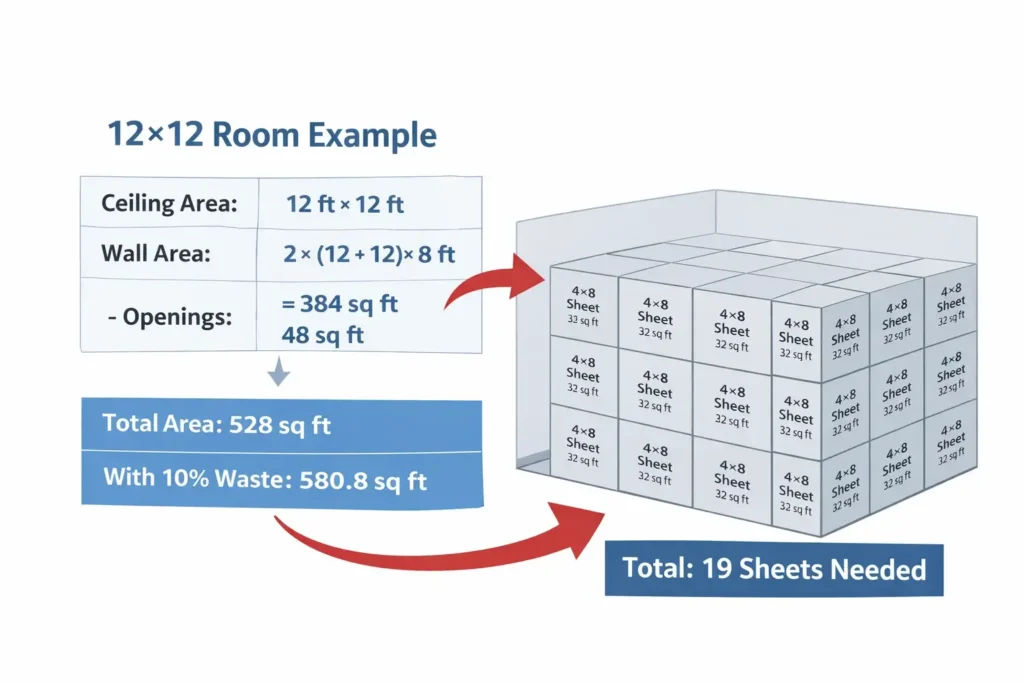
12×12 room example
A slightly larger room increases sheet count quickly.
- Wall area = 2 × (12 + 12) × 8 = 384 sq ft
- Ceiling area = 12 × 12 = 144 sq ft
- Total area = 528 sq ft
After adding waste:
- 528 × 1.10 = 580.8 sq ft
- Sheets needed → 580.8 ÷ 32 = 18.15 → 19 sheets
Larger space examples
For bigger areas, estimation becomes more direct.
- 400 sq ft → about 13 sheets
- 600 sq ft → about 19 sheets
- 800 sq ft → about 25 sheets
These values already include a basic waste adjustment.
These examples help you quickly estimate drywall sheets without full calculations. Adjust values based on openings and sheet size.
Drywall calculator for walls and ceiling together
Most projects require both wall and ceiling coverage. Combining them gives a more accurate estimate.
- Add wall area and ceiling area into one total
- Use the same sheet size across all surfaces
- Apply one waste percentage to the full area
This method works best for full room drywall installation.
For example:
- Walls = 350 sq ft
- Ceiling = 120 sq ft
- Total = 470 sq ft
After waste:
- 470 × 1.10 = 517 sq ft
- Sheets = 517 ÷ 32 = 16.15 → 17 sheets
This combined approach avoids underestimating materials.
Drywall material estimation beyond sheet count
Sheets are only part of the job. You also need finishing materials to complete installation.
Drywall mud and joint compound
Joint compound fills seams and smooths the surface.
- One gallon covers about 100 to 150 sq ft
- Larger rooms need multiple buckets for full coverage
- Three coats are common for a smooth finish
Example:
- 500 sq ft area may need 4 to 5 gallons of compound
Drywall tape requirements
Tape reinforces joints between drywall panels.
- Every seam between sheets needs tape
- Longer walls increase total tape length
- Mesh or paper tape can be used depending on finish level
Estimate tape based on number of joints, not just area.
Drywall screws and fasteners
Screws secure drywall to studs and framing.
- Typical usage is 30 to 40 screws per sheet
- Spacing depends on wall or ceiling installation
- Ceilings often need closer screw spacing for support
Example:
- 20 sheets may require 600 to 800 screws
These materials are often overlooked but impact total cost and time.
Drywall cost estimation basics
Cost depends on materials, labor, and project size. Start with sheet pricing.
- Multiply total sheets by price per drywall panel
- Add cost for compound, tape, and screws
- Include delivery or handling charges if needed
Typical cost ranges:
- Drywall sheets vary by size and thickness
- Compound and tape add smaller but necessary costs
For simple estimates, focus on material first, then add labor.
Drywall installation cost vs material-only estimates
Material cost is only one part of the full project.
- Material-only includes sheets and basic supplies
- Installation cost includes labor, finishing, and sanding
- Textured finishes increase time and cost
Repair work is different from full installation.
- Repairs often cost more per square foot
- Small jobs require more precision and time
Understanding this difference prevents budget surprises.
ommon mistakes when calculating drywall
Small mistakes can lead to extra cost or delays during installation.
- Forgetting to subtract doors and windows from total wall area
- Ignoring waste percentage, which causes material shortages
- Using the wrong sheet size for wall height
- Rounding down sheet count instead of rounding up
- Skipping ceiling area when full coverage is required
Many people also rely on rough guesses. A proper drywall calculator avoids these issues and keeps estimates accurate.
Special cases like sloped walls and angled ceilings
Not all rooms have simple shapes. Some layouts need extra attention.
- Sloped walls increase surface area beyond standard calculations
- Vaulted ceilings require breaking space into smaller sections
- Angled surfaces create more cuts and higher waste
To handle these cases:
- Divide complex shapes into rectangles or triangles
- Calculate each section separately
- Add extra waste, usually 15 to 20 percent
This approach keeps estimates realistic for non-standard rooms.
Drywall calculator tips for accurate results
A few simple habits improve accuracy and reduce waste.
- Measure each wall twice before calculating
- Keep all units consistent, especially when mixing measurements
- Use a slightly higher waste factor for beginners
- Match sheet size to wall height to reduce cutting
If you are planning a full construction project, you can explore other tools in the Construction Calculator Hub to estimate related materials.
When to use a drywall estimator vs manual calculation
Both methods have value depending on the project.
- Use a drywall estimator for quick planning and rough numbers
- Use manual calculation for custom layouts and detailed work
- Combine both methods for better accuracy on larger projects
A tool gives speed, while manual steps give control.
Conclusion: Plan drywall sheets with confidence
Accurate planning saves time, money, and effort on every project. A drywall calculator helps you estimate sheets, area, and waste without guesswork.
Use proper measurements, choose the right sheet size, and include waste. Apply the same method for walls, ceilings, and full rooms.
With a clear approach, you can plan drywall needs with confidence and avoid costly mistakes.